


Share This Article
Are you looking for a way to streamline your trading process? The Topstep dashboard is a powerful tool designed for traders like you. Whether you’re in the Trading Combine or managing a funded account, this proprietary platform provides all the essential features you need in one place. It offers a centralized hub for tracking your performance, managing risk, and accessing your accounts. For any trader at this prop firm, the dashboard is your command center for navigating the path to successful futures trading.
Overview of the Topstep Dashboard
The Topstep dashboard serves as the central hub for all Topstep traders. It’s designed to give you a clear, comprehensive view of your trading journey, from the Trading Combine to a funded account. This is the only platform you need to monitor your progress, check your metrics, and manage your account settings.
Think of it as your personal headquarters for futures trading. With the TopstepX platform fully integrated, you can seamlessly move from analysis to execution. This overview will prepare you for a deeper look into the specific functions and interface essentials that make the dashboard an indispensable tool for prop firm traders.
Key Functions and User Interface Essentials
Navigating the Topstep dashboard is designed to be intuitive, helping you focus on what matters most: your trading. The user interface provides quick access to all essential functions without unnecessary clutter. Key metrics, account status, and performance breakdowns are presented clearly, allowing for efficient analysis in real time.
This streamlined interface helps improve your trading efficiency by putting critical information at your fingertips. You can monitor your progress toward a funded account, check your consistency, and review your daily performance without getting lost in complicated menus. The layout is designed to help prop firm traders manage their accounts effectively.
Here are some of the essential features you’ll find:
- Account Dashboard: A central view of your account size, balance, and key metrics.
- Performance Analytics: Detailed breakdown of your trading statistics.
- Risk Management Controls: Tools to set and monitor your maximum loss limit.
- Payouts Section: Easy access to request your earnings once you are funded.
Account Access and Login Steps
Gaining account access to your Topstep dashboard is a secure and straightforward process. Topstep prioritizes account security, which is why multi-factor authentication (MFA) is now a requirement. This adds an extra layer of protection to your trading profile and funds.
When you first log in or use a new browser, you will be prompted to verify your account. This ensures that only you can access your dashboard. If you ever run into issues, the support team is available to help you troubleshoot. For new Topstep traders, the process is designed to be as smooth as possible.
Here’s how to log in:
- Go to the Topstep dashboard login page and enter your email address and password.
- You will be sent a verification code to your email for MFA.
- Enter the code when prompted to complete the login and access your dashboard.
Setting Up Your Topstep Dashboard Experience
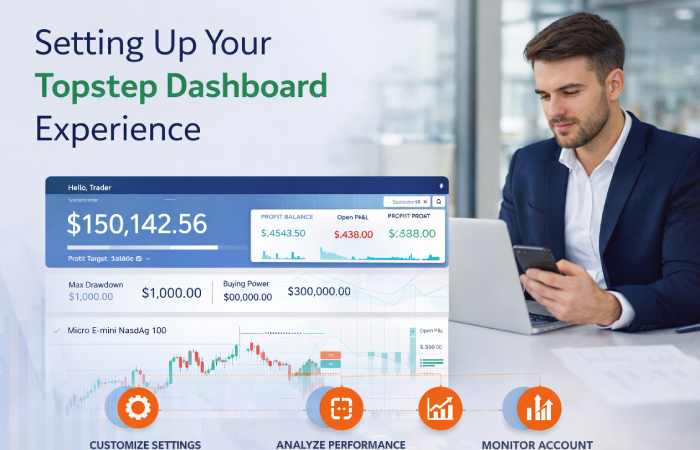
Getting started with the Topstep dashboard is the first step on your journey to becoming a funded trader. The initial setup involves a simple registration process where you’ll choose your account size and gain access to the platform. The new Topstep dashboard is designed to provide a user-friendly experience from the very beginning.
Whether you’re new to Topstep or a returning trader, the platform guides you through the necessary steps. In the following sections, we will walk you through the registration process and how to navigate between different accounts and products.
Registration and Early Access Options
Signing up for a Topstep profile is your entry point into the world of funded futures trading. You can register using an email address or through social login options like Google or Facebook. It’s important to remember that Topstep maintains a single-profile policy, so if you already have an account, you should log in to your existing profile.
While the compiled information doesn’t specify a formal “early access” program for the dashboard itself, being part of the Topstep community often gives traders a first look at new features and updates. The best way to stay informed about any new developments is by being an active trader within the ecosystem.
Once your registration is complete, you’ll have full access to the dashboard. From there, you can start a Trading Combine, choose your account size, and begin your journey toward earning a funded account on the TopstepX platform. If you encounter any issues during registration, the support team is ready to assist.
Navigating Between Accounts and Products
The Topstep dashboard makes it easy to manage and switch between your different accounts. Whether you are in a Trading Combine or have earned a funded account, the interface allows for seamless navigation. This flexibility is crucial for Topstep traders who may be managing different account sizes or strategies.
You can effortlessly toggle between your accounts to check performance, rules, and consistency metrics for each one. This clear separation helps you maintain focus and apply the right strategy for the right account. The dashboard provides a complete breakdown of each account, ensuring you always have a clear picture of your trading activities.
Here’s how you can easily navigate:
- Use the main dropdown menu to select the specific account you want to view.
- Click on your Trading Combine to see your progress toward your goal.
- Select your funded account to review your P&L and payout eligibility.
- The dashboard clearly labels each account by size and type.
Trading Tools and Performance Analytics
The Topstep dashboard is more than just a gateway to your account; it’s a powerful hub for trading tools and performance analytics. It equips traders with the data needed to make informed decisions and refine their strategies. You can access a wealth of metrics and statistics right from your dashboard.
These features are designed to help you track your progress in the Trading Combine and manage your funded account effectively. From real-time performance tracking to integrated risk management, the tools provided on the TopstepX platform are built to support your journey. We’ll now explore how you can manage your trades and analyze your performance in more detail.
Managing Trades and Viewing Statistics
You can easily access your trading stats and performance on the Topstep dashboard. The platform offers a comprehensive view of your trading activity, allowing you to analyze your performance and identify areas for improvement. This is crucial for passing the Trading Combine and succeeding with a funded account.
The dashboard presents your statistics in an easy-to-understand format. You can see a breakdown of your trades, including your win rate, average profit, and other key metrics. This information helps you stay on top of your performance and make necessary adjustments to your trading plan. The integration with the TopstepX trading platform means your data is always up-to-date.
Here is a sample of the key metrics you can track:
| Metric | Description |
|---|---|
| Net P&L | Your total profit or loss after all trades. |
| Winning Day % | The percentage of trading days that ended with a profit. |
| Average Winning Trade | The average profit you make on your winning trades. |
| Average Losing Trade | The average loss you incur on your losing trades. |
| Largest Win/Loss | Your single biggest winning and losing trade. |
Integrated Risk Management Features
A key component of the Topstep dashboard is its integrated risk management features. These tools are designed to help you protect your account and maintain the discipline required to be a successful prop trader. You can set your own limits to prevent overtrading and significant losses.
The platform includes automated controls that enforce Topstep’s rules, such as the maximum loss limit. If your account approaches this threshold, the platform can auto-liquidate your positions to prevent you from breaking the rule. This safety net is invaluable, especially during volatile market conditions. For traders in the Trading Combine or with a funded account, these features reinforce good trading habits.
Key risk management features include:
- Daily Loss Limit: Set a personal daily loss threshold that locks your account when hit.
- Profit Target Lockout: Automatically lock your account for the day once you reach a preset profit goal.
- Maximum Trade Count: Limit the number of trades you can place in a day to avoid overtrading.
Conclusion
In summary, the Topstep Dashboard is designed to enhance your trading experience through its user-friendly interface and powerful analytics. By familiarizing yourself with its key features—from account setup to performance metrics—you can make informed trading decisions that align with your goals. The integration of risk management tools further empowers traders to maintain control over their investments. As you explore the dashboard, remember that leveraging these features can significantly optimize your trading journey. If you have any questions or need assistance, don’t hesitate to reach out for support. Your path to trading success begins with the right tools, and the Topstep Dashboard is here to help you every step of the way!
Frequently Asked Questions
What improvements are included in the latest Topstep dashboard update?
The latest updates to the Topstep dashboard focus on a streamlined user experience and enhanced security. This includes mandatory multi-factor authentication, improved navigation, and deeper integration with the TopstepX platform. The new Topstep dashboard makes it easier than ever to track your performance and manage your account.
Where can I find support if I need help with the Topstep dashboard?
If you need help with the dashboard, you can contact the Trader Support Team directly. Topstep also offers a detailed Help Center, a 24/7 chatbot, and an active Discord community where you can connect with other traders and staff for assistance with any questions you may have.
Does TopstepX provide a different dashboard experience compared to Topstep?
The Topstep dashboard is the central hub for your account, while the TopstepX platform is the execution software where you place trades. They are fully integrated. TopstepX is the only platform offered, so the dashboard is specifically designed to work seamlessly with it, providing a unified and consistent experience.