


Share This Article
Internet users across India often face problems like slow website loading, DNS errors, or incorrect page redirects. These issues are frequently linked to DNS (Domain Name System) behavior. Inside Google Chrome, there’s a powerful hidden tool — chrome.//net-internals/dns— that helps diagnose and fix such problems. This guide about the tool, for India, tells you what the tool does, how to access it, and the benefits it will provide.
What is DNS and Why is DNS Important?
Domain Name System, also known as DNS. It is like the phone book of the web browser, every time you tap on the link or enter the web page in your mobile, your browser will converts that name into a numerical IP address that locates the correct server.
Every DNS history is recorded and stored in your phone, which can sometimes cause websites to fail or get stuck even if you have a strong mobile connection. This is exactly the kind of problem that Chrome Net Internals DNS helps diagnose and fix.
What is Chrome Net Internals DNS?
The tool that I am discussing is also an application installed with Google Chrome browser. The tool allows us to observe the DNS activity in Google Chrome without installing another software.
We can access this tool just by typing chrome.//net-internals/dns in the address bar. A screen comes up showing the DNS records saved in Chrome cache and option for clearing them.
How to Use Chrome Net Internals for DNS?
Using this tool is very simple. Just follow these steps:
Step 1: Open Chrome on your Phone
Step 2: Type Chrome.//net-internals/dns mobile in the search bar and tap Go
Step 3: The page will show you all the DNS record that Chrome has stored in your phone
Step 4: Tap “Clear host cache” button to remove all outdated DNS records and force fresh lookups.
Step 5: You can navigate to chrome.//net-internals/dns and tap “Flush socket pools” for a deeper reset.
Why DNS Matters for Users in India
The Internet in India is diverse, with numerous providers such as Airtel, Jio, BSNL etc. Thus, DNS problems are prevalent in India.
Common Trials:
- ISP-level DNS caching delays
- Regional routing differences
- Slow domain resolution
- Access issues with certain websites
Using this Chrome tool helps users identify and fix these issues quickly.
DNS Components Explained
| Component | Description |
| Host Cache | Stores domain-to-IP mappings |
| TTL (Time to Live) | Duration DNS data is stored |
| Resolver | Converts domain names into IP addresses |
| Negative Cache | Stores failed DNS lookups |
How to Open chrome://net-internals/dns
Follow these phases:
| Step | Action |
| 1 | Open Google Chrome |
| 2 | Type the following into your address bar: chrome://net-internals/dns |
| 3 | Press Enter |
| 4 | Access DNS cache and lookup details |
How to Clear DNS Cache in Chrome
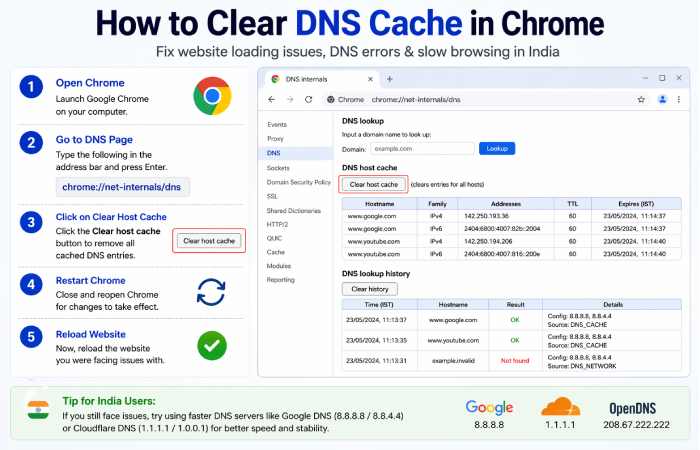
Clearing DNS cache can fix many issues faced by users in India.
Steps:
| Step | Description |
| 1 | Open chrome://net-internals/dns |
| 2 | Click Clear host cache |
| 3 | Restart Chrome |
| 4 | Reload the website |
Common DNS Issues in India & Solutions
| Issue | Cause | Solution |
| Website not loading | Outdated DNS cache | Clear cache |
| Wrong website version | ISP DNS conflict | Flush DNS |
| Slow browsing | Slow DNS servers | Switch DNS |
| Login/session errors | Cached IP mismatch | Restart browser |
Best DNS Servers for India
Switching DNS servers can significantly improve browsing performance.
| DNS Provider | Primary DNS | Secondary DNS |
| Google DNS | 8.8.8.8 | 8.8.4.4 |
| Cloudflare | 1.1.1.1 | 1.0.0.1 |
| OpenDNS | 208.67.222.222 | 208.67.220.220 |
When to use this tool ?
You should use chrome://net-internals/dns when:
- Websites are not loading
- You see outdated content
- DNS errors appear
- You recently changed hosting or DNS settings
Benefits
- Fast troubleshooting tool
- No external software needed
- Improves browsing reliability
- Useful for developers and advanced users in India
Limitations
- Not beginner-friendly
- Works only in Google Chrome
- Cannot fix server-side issues
FAQs
- And the query is chrome://net-internals/dns?
This is Chrome’s own page used to examine and control DNS cache and lookup activities.
- Is it safe to clear DNS cache?
Yes, deleting DNS cache is safe and advisable to fix browsing problems.
- Why are DNS issues common in India?
Due to ISP caching, network congestion, and regional routing differences.
- Does changing DNS improve speed?
That’s right. Faster DNS servers, such as those on google or Cloudflare, will make internet browsing a faster experience.
- Can I use this in my mobile?
It has limited functionality on transportable browsers; best used on desktop.
Conclusion
chrome.//net-internals/dns mobile is a powerful tool for solving DNS issues on Android. Whether you are dealing with slow loading speeds or website errors, sympathetic and using this tool it can help you to fix the problems quickly and improve your overall internet knowledge.
